

YAFOY · Know what matters
All your messages, in one place
Email, chat and texts together, so you check one app instead of eight.
01
7:12 a.m.
Your alarm is still ringing when you pick up your phone. Seven red badges are waiting.
Email: 14. WhatsApp: 9. Slack: 6. Texts: 3. Teams: 2. Instagram: 1. LinkedIn: 1.
You start at the top and work your way down, opening each app, scrolling, closing it, opening the next. By the time you reach LinkedIn, you've forgotten what was in the first email.
02
The hunt
Later that morning, you need the address a friend sent you for Saturday. Was it a text? WhatsApp? An Instagram message? You check three apps before you find it, at the bottom of a group chat, under twenty photos of someone's dog.
It's not that you get too many messages. It's that they live in too many places, and none of those places talk to each other. So you become the one who keeps track of everything: who said what, where, and whether you ever answered.
03
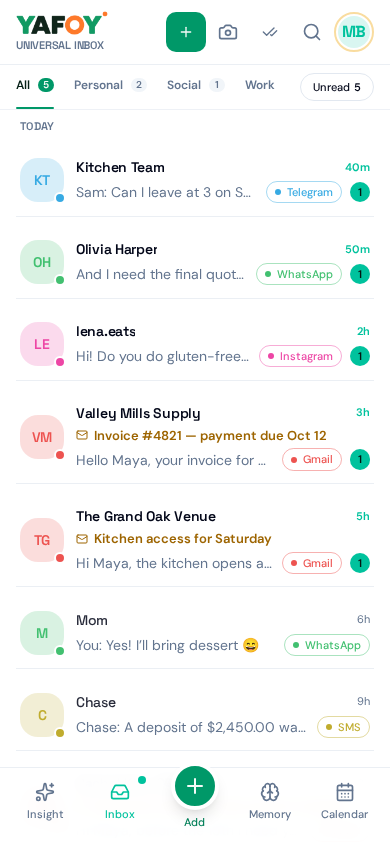
Now, one list
Open YAFOY instead. New messages from your supported apps, in one list, in the order they arrived. The client's email, your sister's WhatsApp, the Slack question from your manager, the school's text, side by side.
The address for Saturday? It's right there, two messages down.
04
Sorted without the work
When you want to focus on one part of your life, tap a tab:
Personal (WhatsApp, Telegram, Signal, texts) · Social (Instagram, Messenger, X, Discord) · Work (Slack, Teams, Google Chat, LinkedIn) · Mail (Gmail, Outlook and more).
On Saturday morning, stay in Personal. On Monday, start with Work. The rest waits quietly.
05
Reply from the same screen
Answer email, Teams and Slack messages without opening their apps. On Android, you can also reply to many chat apps from YAFOY when their notifications allow it. Fewer apps opened, fewer places to lose your train of thought.
06
7:12 a.m., tomorrow
Same alarm. One app. You scroll one list, reply to the two messages that need you, and put the phone down before your coffee is ready.
A few questions, answered.
Which apps work on my phone?
It depends on your phone. See YAFOY for Android and YAFOY for iPhone for the full lists.
Do I lose anything in my original apps?
No. Your messages stay in their original apps too. YAFOY shows them alongside each other.
Can I use YAFOY on my computer?
The web version is available, but account connections are available in the phone apps. Your Inbox does not sync to your computer.