

YAFOY · Know what matters
YAFOY for Android: every message in one inbox
On Android, YAFOY can bring together messages from almost any app on your phone.
01
The waiting room
Your phone already knows about every message you get. They all pass through the same place: the notification shade.
But the shade is a waiting room, not an inbox. A supplier's WhatsApp sits next to a Telegram group, a text from the school and a Slack ping. Swipe one away by accident and it's gone. Get thirty at once and the important one slides off the bottom. By evening, you couldn't say what came in, or from where.
02
Turning the waiting room into an inbox
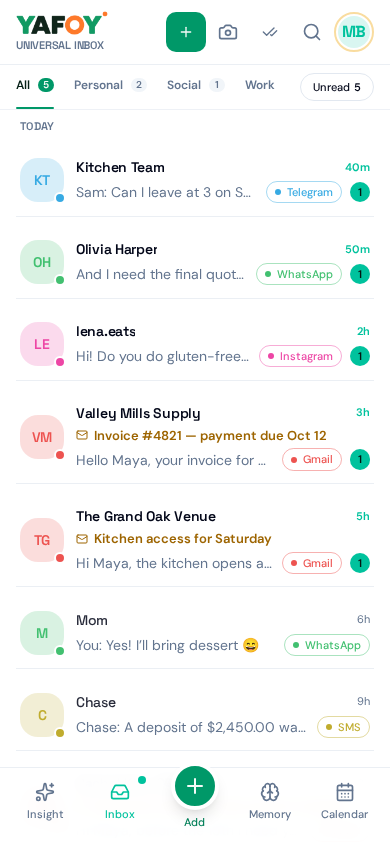
Android lets you choose one app you trust to see your notifications. With your permission, YAFOY uses that to gather the messages that arrive on your phone, from WhatsApp, Telegram, Signal, texts, Messenger, Instagram, LinkedIn, Discord and more, and keeps them in one inbox, organized and searchable, even after the notification is gone.
Gmail, Outlook, Teams and Slack connect directly through your accounts, for email threads, chats and attachments.
03
A Tuesday on Android
8:40: the supplier confirms tomorrow's delivery on WhatsApp. 9:15: the school texts about Friday's trip. 10:02: a Slack question from a colleague. 10:30: a customer writes on Instagram.
You don't chase any of them across apps. They're all in YAFOY, in order. You answer the text and the Slack question from the same screen, reply to the supplier from the WhatsApp notification action, and Insight reminds you about the customer before lunch.
And when you just want a glance, the home-screen widget shows what's new without opening anything.
04
What to know
For apps gathered through notifications, YAFOY sees what appears in the notification as it arrives, not that app's full history. Replies work when the notification offers a reply action. Texts can be read and answered directly.
A few questions, answered.
Does YAFOY need special permissions?
Yes: notification access, which you grant in Android settings. You can turn it off at any time.
Can I import an old WhatsApp chat?
Yes, you can import an exported chat file.
Where do I get the app?
Visit the download page for Android availability Get the app.