

YAFOY · Know what matters
YAFOY for iPhone: email, Slack and Teams together
Connect your work and email accounts on iPhone, and let Insight show you what needs you first.
01
Four apps, one job
Your workday lives in four apps. Outlook for clients. Gmail for everything personal. Teams for the company. Slack for the project you joined last spring.
Every one of them sends notifications, and every one of them has to be opened, scrolled and closed. Somewhere between them, a client's email waits two days for a reply, because you thought you'd seen everything.
02
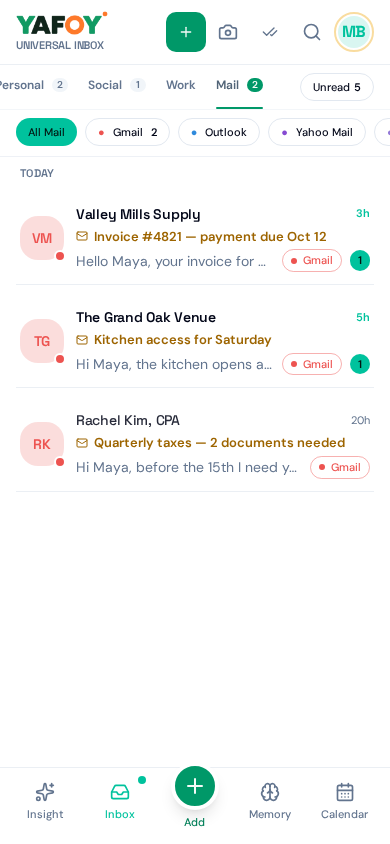
One inbox on your iPhone
With YAFOY, Gmail, Outlook, Microsoft Teams (work and school accounts) and Slack arrive in one inbox. Read and reply without switching apps: email with threads and attachments, Teams and Slack right from the same screen.
And at the top, Insight sums up which of those conversations need you first, and which can wait.
03
A morning on iPhone
On the train, you open YAFOY once. Insight says a client asked for the contract in Outlook, your team lead needs a yes or no in Teams, and the Slack thread can wait. You answer both before your stop. The rest of the commute is yours.
04
Being straight about iPhone limits
Apple doesn't let other apps read your notifications or messages from apps like WhatsApp, Telegram or Signal. So on iPhone, those aren't available in YAFOY. Texts and iMessage can be brought in through an Apple Shortcut, with limited support. If those chats matter most to you, YAFOY for Android does more.
A few questions, answered.
Does YAFOY work with WhatsApp on iPhone?
Not today. Apple doesn't allow it. On Android, it does.
Can I see my iMessages?
In a limited way, through an Apple Shortcut that you set up. YAFOY can't reply to iMessages directly.
Where do I get the app?
Visit the download page for iPhone availability Get the app.